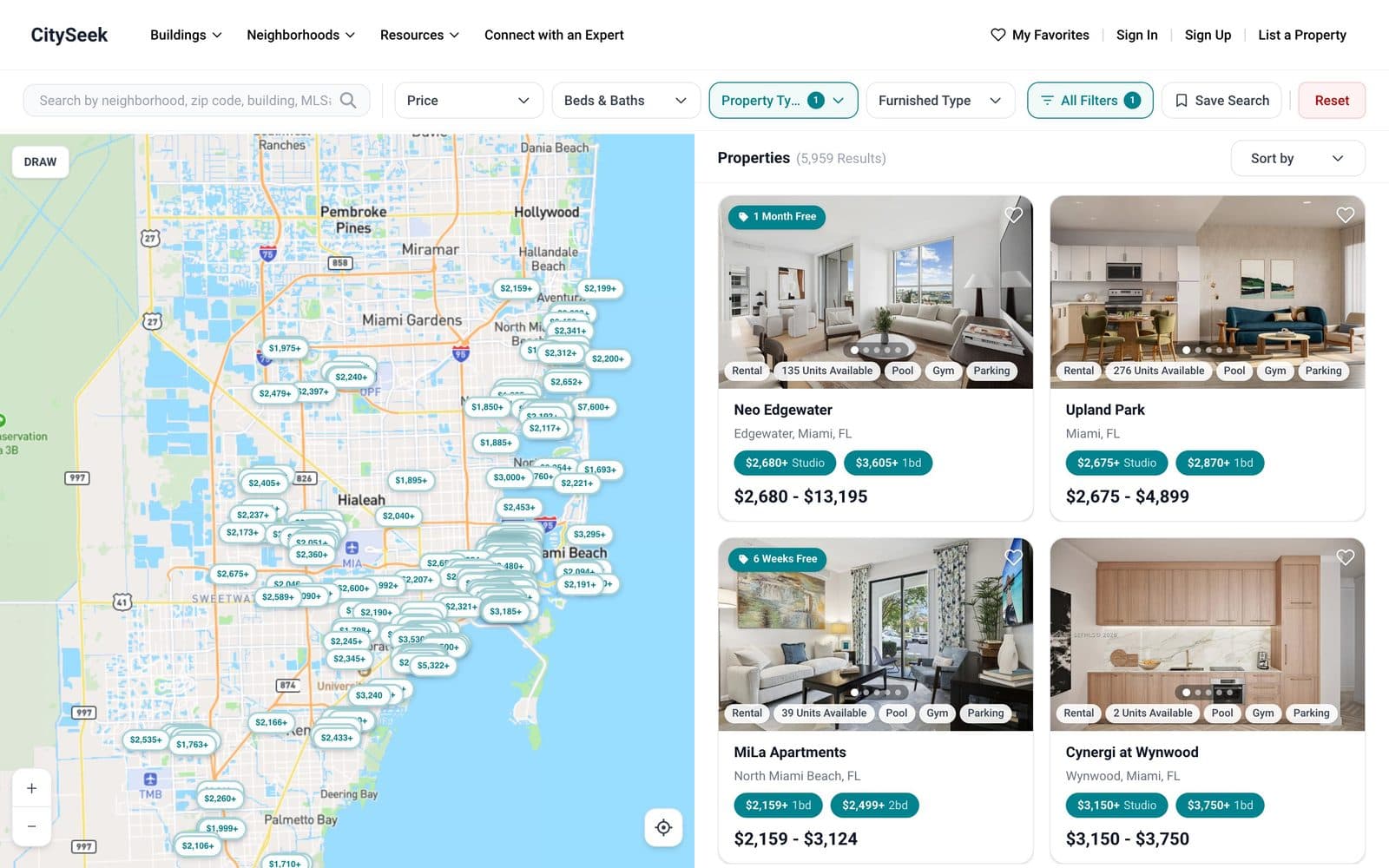
An IDX website is a real estate website that displays listings from the local Multiple Listing Service (MLS), including listings from other brokers, through Internet Data Exchange (IDX). It lets a buyer search every active home in your market on your site, instead of leaving for Zillow or Realtor.com.
If you're a realtor or broker planning a new site, IDX is the part that decides whether the site actually brings in leads. This guide explains how IDX works, how it differs from the MLS, the ways to get IDX on your website, and what each option costs. It's written by the team at Avenva Solutions, which builds real estate websites and listing platforms such as CitySeek.
IDX vs. MLS: what's the difference?
The MLS is the shared database where member brokers list properties and agree to cooperate on sales. IDX is the policy and data feed that lets a member display those listings to the public on a website. In short, the MLS holds the listings and IDX is your permission to show them.
| Compared on | MLS | IDX |
|---|---|---|
| What it is | A members-only database of listings | Permission and a data feed to show MLS listings publicly |
| Who uses it | Licensed agents and brokers | Buyers and renters on your website |
| Data shown | Full detail, including agent-only fields | Public fields only, under MLS display rules |
| How you get it | Join your local MLS | MLS membership plus broker approval and an IDX agreement |
How IDX works
- You join your local MLS and your broker approves IDX access for your website.
- You sign an IDX agreement with the MLS and choose a vendor or developer to handle the feed.
- The feed delivers active listings, photos, and updates to your site, usually through the RESO Web API, the industry standard that replaced the older RETS format.
- Your site refreshes listings on the schedule your MLS requires, often at least every 12 hours, and removes sold or expired listings.
- Every listing shows the required attribution, such as the listing brokerage's name and the MLS disclaimer.
Three ways to get IDX on your website
| Option | How it works | SEO value | Typical cost |
|---|---|---|---|
| Iframe or widget IDX | The vendor's search sits inside a box on your page | Low: listings are credited to the vendor | Tens of dollars a month |
| Organic IDX plugin | Listing pages are generated on your own domain | Good: each listing can be indexed | Tens to a few hundred dollars a month |
| Custom RESO Web API build | Your developer pulls the feed into your own database and pages | Best: full control of pages, speed, and structured data | $8,000-$40,000 to build, plus MLS fees |
Key takeaway
If search traffic matters to you, avoid iframe IDX. The listings may look like they're on your site, but Google gives the credit to someone else.
MLS integration and the RESO Web API
MLS integration is the part that decides whether your listing pages are fast and accurate. With an MLS integration API, which today means the RESO Web API at almost every MLS, your site pulls listings, photos, and status changes into its own database and builds a page for each one. That is what lets each listing load quickly and rank on its own.
Access is not automatic. Your MLS has to approve you, your broker has to sign off, and the developer usually signs a vendor agreement too. Each MLS sets its own refresh rules, display rules, and data fees. Plan for that paperwork before any code gets written. It is the usual reason an MLS integration takes longer to start than to build.
If you work across more than one MLS, each feed needs its own approval and its own field mapping, because the same listing can be described differently in each one. We cover what this looks like in a full build on our real estate website development page.
What an IDX website for realtors should include
- Fast search with filters for price, beds, baths, property type, and the neighborhoods buyers actually search for.
- A map view that stays in sync with the filters and the list of results.
- Saved searches and email alerts, so new matches arrive from you rather than from a portal.
- Listing pages with large photos, video, floor plans, and a clear way to book a showing.
- Lead capture that sends every inquiry into your CRM, tagged with the listing it came from.
- Agent pages, so leads from a listing go to the agent who owns it.
- Neighborhood and building pages that show your local knowledge and rank for searches portals don't own.
- RealEstateListing structured data and fast mobile pages, so Google can read and rank each listing.
IDX integration cost
The cheapest path is an off-the-shelf IDX vendor on a template site, which costs a monthly fee and very little up front. It works, but you're limited to the vendor's search design, and with iframe IDX you give up most of the SEO value. A custom integration on the RESO Web API costs more to build, typically $8,000 to $40,000 depending on the search features, maps, and number of MLS feeds, but your listings become fast, indexable pages on your own domain, designed the way you want.
Most brokers we talk to start with a vendor and move to a custom build when they want better search, a stronger brand, or listing pages that rank. At Avenva, simple websites start from $500 and web app MVPs from $1,000, and we quote a fixed price for your scope after a short call.
Common IDX mistakes
- Choosing iframe IDX and wondering why listings never show up in Google.
- Ignoring MLS display rules, which can get IDX access suspended.
- Sending leads to a vendor inbox instead of your CRM, so follow-up is slow.
- Letting sold listings linger, which frustrates buyers and breaks MLS rules.
- Relying on listings alone, with no neighborhood or building pages to win local searches.
If you're planning a new site, our real estate website development page shows how we build IDX websites and agent apps, and our guide to real estate app development cost covers the budget for going further.