Copperleaf Desk: Slack Ticketing System Case Study
A Slack ticketing system for a 300-person company: anyone can raise a ticket from any channel, owners update status with one click, and every employee sees their assigned tickets on the app's Home tab.
Industry
Professional Services
Timeline
7 weeks
Team
2 engineers, 1 designer
Category
Workflow Automation
An IT ticketing system scattered across DMs and inboxes
Copperleaf's IT, facilities, and people-ops teams took requests through Slack DMs, channel mentions, and a shared inbox. Requests were easy to miss, nobody could tell who owned what, and employees had to chase people in DMs to find out whether anything was happening with their request.
How we built Slack ticket management for three teams
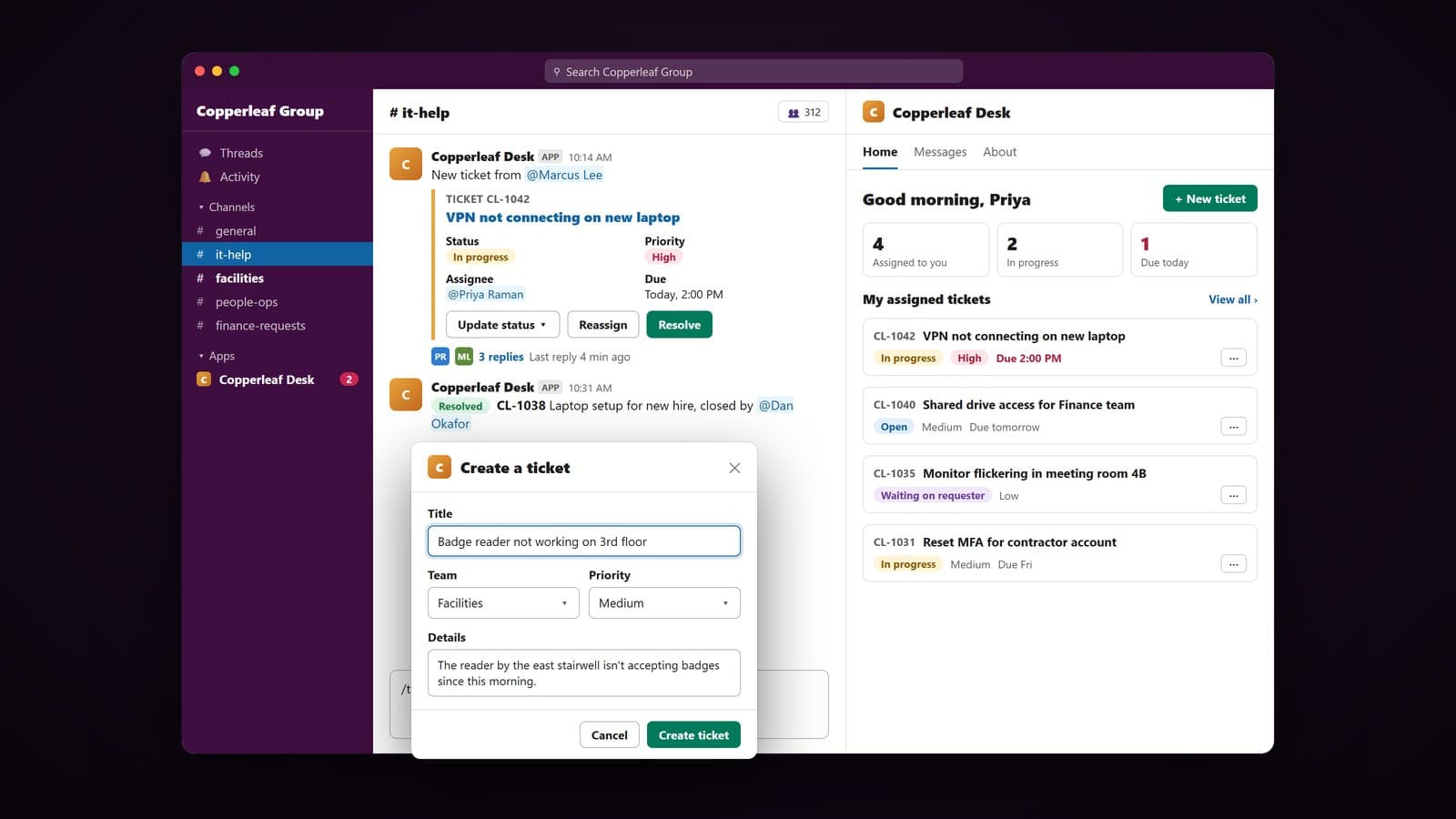
Raise a ticket from anywhere in Slack
Built a /ticket command, a message shortcut, and a New ticket button that all open the same short form for title, team, priority, and details. Shortcuts pre-fill the form from the original message, and each ticket is posted to the right team channel with its own ID.
Status that stays current on its own
Every ticket card carries buttons to update status, reassign, or resolve. Each change updates the card in place, logs to the ticket's thread, and sends the requester a DM, so nobody has to ask for an update.
A personal ticket list on the Home tab
The app's Home tab shows each person their assigned tickets with status, priority, and due date, plus counts for what's in progress and due today. Team leads get a team-wide view, and overdue tickets trigger reminders in Slack.
Slack ticketing system results
3 teams
IT, facilities, and people-ops on one ticketing flow
100%
Requests tracked with an owner and a status
0
Extra tools for employees to learn outside Slack
Tech stack
Slack Bolt (Node.js)
Handles the /ticket command, shortcuts, button actions, and Home tab events.
Block Kit
Builds the ticket cards, the create-ticket form, and the Home tab layout.
TypeScript
Types every ticket state and status change the bot can apply.
PostgreSQL
Stores tickets, assignments, and the full status history for each one.
Redis
Queues SLA reminders and overdue alerts on a schedule.
AWS
Hosts the bot service and database, with logging for every action.